ESP32-S3 Open Source

Your desk knows
things now.

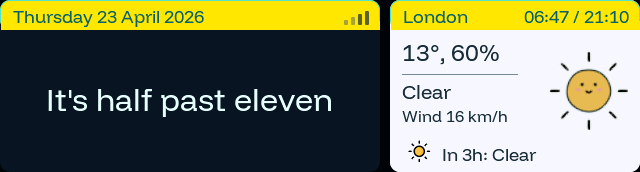
A mass of sensors, pixels, and unresolved ambition, pretending to be furniture. Word clock in 14 languages, weather, news, Wikipedia, Now Playing from macOS, live public-transport timetable, rocket launch countdowns, Mac stats, and live Bambu Lab prints — on a 3.49" IPS touchscreen.

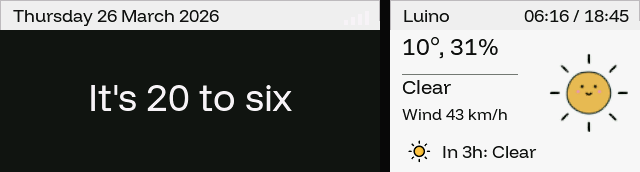
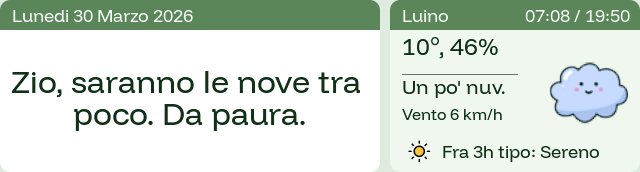
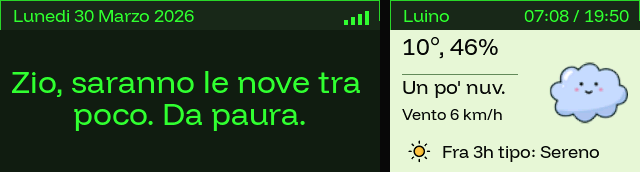
ScryBar Default theme preview

“sono le undici e ventitré”

🇮🇹 Italiano

Nine captured screens, one thumb

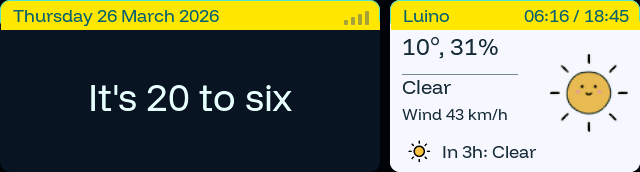
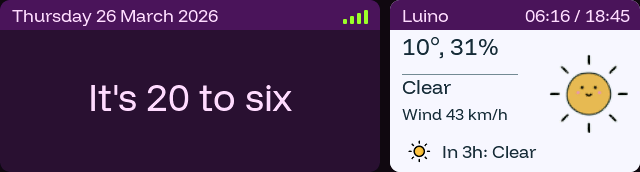
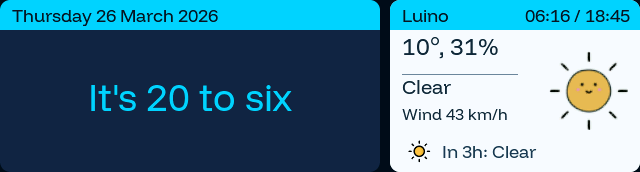
Swipe left or right through the carousel, then reorder the sequence from the web UI. Every gallery image comes from the physical 640×172 display; the Bambu Lab view was captured during a real A1 print.

Everything on a 3.49" bar

Nine public views, one horizontal bar. Enable the pages you want, reorder their physical swipe sequence from the web UI, and the carousel closes ranks around the rest.

Word Clock

Natural-language time in 14 languages. From Italian to Klingon to Pirate English. Real grammar, not tiles.

Live Weather

Current conditions and three-hour outlook. Location configurable. Refreshes every 15 minutes.

RSS Feeds

Up to 5 news feeds with live favicons and a QR to finish the article on your phone.

Wikipedia

Featured, On This Day, random discoveries. 8 languages. Trivia you didn’t ask for, delivered anyway.

Now Playing

macOS companion pipes the system-wide Now Playing session. Album art, progress bar, source tag.

Timetable

Live departures worldwide via Transitous. Countdown in prime notation, like the LED at a real bus stop. No API key.

Launches

Rocket countdown hero with pad weather and a QR to the mission page. Know the moment SpaceX slips again.

Mac Stats

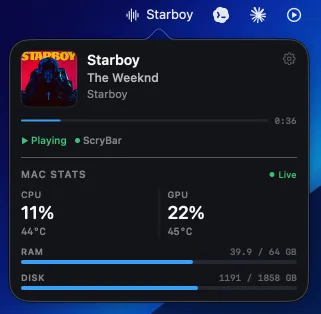
CPU/GPU load and temps, RAM and disk bars, pushed from the companion. Activity Monitor, but ambient.

Bambu Lab

Live job, progress, layers, temperatures, speed, fans, filament and AMS telemetry. Credentials stay on your Mac.

Up and running in minutes

No soldering, no SDK, no app store. Plug in, flash, configure.

Step 1

Plug In

Connect USB-C to your device and computer.

Step 2

Flash

One click from your browser. No toolchain, no drivers.

Step 3

Connect

Device creates a WiFi AP. Open the config page and set up.

Step 4

Enjoy

Clock, weather, news, transit, Mac and Bambu telemetry — all running on your desk.

A menu bar app that makes ScryBar know you.

Live Now Playing metadata, album art, CPU/GPU temperature, RAM, disk usage, Bambu Lab print telemetry and an on-demand A1/P1 camera — streamed from your Mac to the strip over your LAN.

macOS 14+ v0.3.5 Menu bar · ~8 MB · Swift 6
ScryBar Companion app icon
ScryBar Companion popover: Now Playing + live Mac Stats
Pushing to ScryBar over LAN
Download stable DMG v0.3.5 Ad-hoc signed · Apple Silicon + Intel · ~8 MB
First launch

Four taps to menu bar.

The app is ad-hoc signed (no paid Developer ID), so Gatekeeper blocks it on first open. This is a one-time step — after that, launches are instant.

  1. 01

    Mount & drag

    Open the .dmg and drop ScryBarCompanion.app into /Applications.

  2. 02

    First launch blocked

    Double-click — macOS says "cannot be opened because Apple cannot check it for malicious software." Expected.

  3. 03

    Open Anyway

    System Settings → Privacy & Security, scroll to the blocked-app notice, click Open Anyway, confirm with password.

  4. 04

    It lives in your menu bar

    The ScryBar glyph appears top-right. Future launches are instant. Quit from the popover menu anytime.

zsh — shortcut skip Gatekeeper
$ xattr -dr com.apple.quarantine /Applications/ScryBarCompanion.app
$ open /Applications/ScryBarCompanion.app
Hardware

Get the board

ScryBar runs on the Waveshare ESP32-S3-Touch-LCD-3.49 — a $20–30 development board with a 640×172 IPS display, capacitive touch, IMU, and USB-C. Available on AliExpress worldwide.

ESP32-S3 640×172 IPS ~$20–30 No soldering
Buy on AliExpress

Search esp32 3.49 — the board ships from China, typically 2–3 weeks.

Flash from your browser

No toolchain. No drivers. Plug in USB-C, click flash. Powered by Web Serial API.

First install? If the browser can't detect your device, put it in bootloader mode first: hold BOOT, tap RST, release BOOT — then click Install Firmware. Only needed the very first time, or whenever the button shows "No device found".

ScryBar Firmware

latest

Word clock, weather, RSS, Wikipedia, Now Playing, live public-transport timetable, rocket countdowns, Mac stats, and the Bambu Lab print view. Everything ready to use out of the box.

Web Serial is not available in this browser. Open this page in Chrome, Edge, or Opera on desktop. Firmware installation requires a secure HTTPS connection.

Loading secure installer…

After flashing

  1. Device boots and starts a WiFi access point ScryBar-Setup-XXXX
  2. Connect from your phone or laptop
  3. Open http://192.168.4.1:8080 to configure WiFi, theme, language, weather, RSS feeds, and view order

Requires a desktop browser with Web Serial support (Chrome, Edge, or Opera). Safari, Firefox, and iOS browsers are not supported.

Recent releases

Full history in GitHub Releases.

v0.9.4

latest r307

Reliable page swipes and estimated print finish time

  • Fix Page drags select the next view reliably instead of snapping back. Slow drags remain valid, and touch release timing is independent of rendering and network load.
  • New Companion v0.3.5 shows the estimated print finish day and local time alongside remaining time, while a print is active.
Show 10 previous releases v0.9.3 · v0.9.2 · v0.9.1 · v0.9.0 · v0.8.2 · v0.8.1 · v0.8.0 · v0.7.0 · v0.6.0 · v0.5.0

v0.9.3

r306

Bambu camera on demand, with clear light controls

  • New Watch an A1/P1 printer from ScryBar or Companion v0.3.4, without Bambu Studio. Both viewers share one LAN camera stream.
  • New Closing the last camera viewer stops the stream and requests light-off, with persisted cleanup and retry after reconnection.
  • UI A clearer CAM button, aligned status badges and FINISHED label. The device camera separates Light: ON/OFF from Turn on/off and keeps Back as its only exit control.
  • Fix More reliable camera taps, clean Connecting text and restored grayscale edges on the Netmilk boot logo.

v0.9.2

r302

Bambu connection recovery and filament telemetry

  • Fix Companion v0.3.3 restarts rate-limited discovery after network failures and uses the saved LAN name as a fallback after printer serial matching.
  • New The Bambu display rotates through print filament labels and colors. Companion and firmware show observed settled filament changes, with a total when supplied by the printer.

v0.9.1

r301

Stable Bambu identity and automatic IP recovery

  • Fix Companion v0.3.2 identifies a saved Bambu printer by serial before considering a selected or previously saved IP. DHCP address changes now update the stored endpoint and reconnect MQTT automatically.
  • Fix Bare SSDP echoes without a Bambu serial or model are rejected, so false printer entries can no longer suppress the verified LAN-service fallback scan.
  • Fix Manual-IP selection remains available for segmented networks, while the normal path prefers the richer LAN identity and preserves the access code in macOS Keychain.

v0.9.0

r300

Bambu Lab telemetry, animated Meteocons, reorderable views

  • New Bambu Lab page — live job and stage, progress, remaining time, layers, nozzle/bed/chamber temperatures, speed, fans, Wi-Fi, filament and AMS telemetry, with alert states on the physical 640×172 display.
  • New Companion v0.3.1 connects to a Bambu printer over local MQTT/TLS, keeps the LAN access code in macOS Keychain, forwards a sanitized payload to ScryBar, and can play distinct start, blocked and finished sounds.
  • New Views can now be reordered from the device web UI. The validated sequence persists in NVS and drives the real physical swipe carousel, including Home and Bambu.
  • Fix Printer discovery deduplicates the same printer advertised under multiple Bonjour identities; Settings now exposes clear discovery, selection, retry, connection status and setup help.
  • Fix Mobile web config no longer inherits desktop sticky-footer margins, eliminating horizontal overflow while keeping 42 px reorder controls.
  • New Physical-display typography now uses Dosis Regular and SemiBold, generated independently from the official SIL OFL 1.1 font source with full Latin Extended coverage.
  • Polish Bambu progress is larger and cleaner: the filename remains in the rotating footer, while telemetry captions use readable Title Case.
  • New Home weather now uses 19 full-color Meteocons variants driven by live Open-Meteo WMO codes, including day/night states, fog, precipitation intensity, sleet, snow, thunderstorms and hail. The current icon is animated on-device; the compact forecast stays still.
  • Fix Bambu print stage and connection state now sit on compact near-black header badges. Printing stays white, while Running and its indicator use Bambu green with reliable contrast across bright themes such as Tokyo Transit.
  • Polish Primary on-device header titles now use Dosis SemiBold at 20 px: one restrained size step up from Regular 18 px, while secondary status, time and metadata retain their existing hierarchy.
  • Polish Bambu print progress now fills its left rail with a vertically centred 126 px ring, a wider and lighter remaining track, rounded green endpoints, and larger SemiBold telemetry captions.
  • Polish A full physical-view typography audit aligned Now Playing with the Dosis hierarchy: its compact header is now SemiBold 18 px, track titles use SemiBold 25 px, and the artist follows the actual one- or two-line title height instead of a fixed empty gap.
  • Polish Bambu progress now retains 8 px of breathing room above and below its body-centred ring. The rotating telemetry footer uses Dosis 18 px with Bambu-green labels and white values/separators for faster scanning.
  • Polish Weather Meteocons are tightly cropped at native 84 px and animate at a calmer 5 fps only while Home is visible. The three-hour forecast uses a crisp monochrome 30 px icon with automatic contrast across every theme.
  • Fix Now Playing restores album artwork even when a player exposes no native cover identifier: Companion v0.3.1 build 36 creates a stable local artwork identity, while the physical view now shows the album title beneath the artist when available.
  • Fix Now Playing duration is positioned relative to the live sync label, preventing the longer Out of Sync state from colliding with the time in the compact header.
  • Polish Home weather now uses a dark theme-tinted surface across all seven themes. Current Meteocons gain stronger contrast, while a subtly lifted forecast rail and automatic soft-white text preserve hierarchy on the 640×172 display.
  • Fix Companion v0.3.1 sizes its popover from the display’s real usable height. It now opens tall enough for its content whenever space permits and scrolls only when the screen is genuinely too short.

v0.8.2

r283

Snappiness overhaul, touch quality pass, Companion quit & clean shutdown

  • Perf LVGL draw buffer moved to internal SRAM — 3.7× faster render handler. Page-visibility steady-state caching and Mac Stats change detection skip re-rendering anything that didn’t change.
  • Fix Switching themes leaked a PSRAM buffer on every switch on pages with a QR canvas — the canvas buffer is now reused instead of recreated.
  • Fix Touch classification tightened: the fast-swipe shortcut is gone (it could misread slow taps as page swipes), and NXT / SKIP / QR buttons use precise 8×2 px hit padding so a tap near a shared edge dispatches only its own action.
  • New Companion v0.2.4 — quit the app directly from the popover (power icon next to the gear) or from the Settings footer. Termination is clean: polling stops and the macmon subprocess is terminated, never orphaned.
  • Fix Companion status is now truthful: “Connected” only after a successful send to the device in the last 8 seconds, otherwise “Waiting” with an amber dot. macmon runs as one long-lived pipe instead of a new process every 5 s.
  • Fix INFO page density pass — all six rows fit without clipping. Now Playing shows an honest stale state when live data stops flowing.

v0.8.1

r279

Now Playing color fix, header polish, web gallery refresh

  • Fix Now Playing album art colors were corrupted — golden/amber tones (e.g. STARBOY) appeared pure red. Root cause: companion used CGBitmapContext with byteOrder32Big|premultipliedLast, which is not hardware-accelerated on Apple Silicon. Core Graphics renders BGRA regardless, zeroing the G high bits for warm colors. Fixed by using the native byteOrder32Little|premultipliedFirst (BGRA) format.
  • Fix Now Playing header strip: title and status were offset +2px downward, pressing them against the divider above the album art. All four label objects now use y = 0 so the strip reads as vertically centered.
  • Fix Launches hero: country label enlarged from 14 px to 16 px; TAP·SCAN QR hint opacity raised from 70 % to 90 % for better legibility at a glance.
  • New Features section redesigned as horizontal cards — icon on the left, title and description stacked on the right, four columns across. “7 Themes” and “LAN Config” removed; both are already covered elsewhere on the page.
  • New View gallery refreshed: companion screenshot removed (shown in the Companion section below), device bezel frames added around each image. All 8 screenshots recaptured with London weather, English word clock, Liverpool Street Station for Timetable, and a different theme per view.

v0.8.0

r277

Timetable rename, prime-notation countdown, DST bug fix

  • New The Departures page is now Timetable. Scheduled HH:MM is replaced by a real countdown in prime notation — 3′, 14′, 45′ — that ticks every minute. Over an hour away you get the absolute time back; imminent departures go amber. Just like the LED at a real bus stop.
  • Fix Every transit time was an hour in the future during Central European Summer Time. Root cause was a stack of throwaway mktime() calls in the ISO parser that left newlib’s DST state inconsistent, so localtime_r applied the savings hour twice. Parser rewritten; stoptimes query now uses time(nullptr). Year-round correct under CET and CEST.
  • New Landing page now shows all nine views in a three-column grid so you can see what you’re flashing before you flash it.
  • Fix Launches page, compact row view: the provider pill now fills the full row height with 20 px breathing room between the pill and the mission data. No more half-height pill floating above triple-height text.
  • New Serial command aliases: TIMETABLE and VIEWTIMETABLE also jump to the transit page (the legacy TRANSIT / VIEWTRANSIT still work).

v0.7.0

r274

Mac Stats page, Companion v0.2.1, landing redesign

  • New Mac Stats page — live CPU/GPU usage and temperature, RAM and disk bars, pushed from the companion app over LAN. Sparkline history, chunky segmented bars, color-coded Good/Warm/Hot status.
  • New ScryBar Companion v0.2.1 with a synthwave app icon, Mac Stats section in the menu-bar popover, and macmon integration for Apple Silicon CPU/GPU temperatures (no sudo).
  • New Landing page Companion section redesigned: cinematic icon hero, faux-macOS popover window, four-step first-launch flow, Terminal shortcut for skipping Gatekeeper.
  • Fix Curly quotes, em-dashes, and ellipsis in podcast and RSS titles no longer render as tofu squares — sanitized to ASCII before LVGL display.
  • Fix Mac Stats sparklines and progress bars were invisible at boot (LVGL bg_opa default). Contrast tuned across all seven themes — LIVE label and track segments always legible.

v0.6.0

r262

Brightness control, unified screensaver, touch fix

  • New Dual brightness sliders in the web UI — separate levels for USB-C and battery, live-apply while dragging.
  • New Unified Pasture screensaver. Nordic Night palette across every theme, four fixed zones, cow that grazes and sleeps. No more grass-vs-clock overlap.
  • Fix Rapid-tapping the Wikipedia page no longer sneaks the screensaver in. Root cause was a uint32_t underflow in a cross-handler race — fixed and flagged as a CRITICAL gotcha in the repo.
  • Fix Departures toggle in the web UI now actually disables the page. Launches gets its own checkbox (previously always-on).

v0.5.0

r256

Launches page, Cinematic hero, font unification

  • New Rocket launches page with cinematic countdown hero, weather at the pad, and a QR jump to mission details.
  • New Typography unified on Funnel Display (Regular + SemiBold), with Latin Extended coverage for international station and mission names.
  • Fix Launch metadata parser handles the full Launch Library 2 shape — no more NET-only placeholders when precise T-0 data is available.

What's inside

Waveshare ESP32-S3-Touch-LCD-3.49 — a bar-shaped IPS touchscreen with enough power to run a game engine.

MCU
ESP32-S3
Display
3.49” IPS 640×172
Controller
AXS15231B
Touch
Capacitive (single-point)
Flash
16 MB
PSRAM
8 MB OPI
WiFi
2.4 GHz 802.11 b/g/n
IMU
QMI8658 (accel + gyro)
Interface
USB-C (data + power)
Battery
Onboard monitor (ADC)
Framework
Arduino + LVGL 8
Licensing
Project + third-party notices